Run Your Screen Print Shop with More Control
Print Cost Wizard helps screen print shop owners organize customers, quotes, jobs, costs, and shop activity in one simple program.
Built by a screen printer, for screen printers, it helps you stay organized from the first customer request to the final quote and production details.
-
One-time desktop purchase.
-
No monthly subscription.
-
Your shop data stays on your PC.

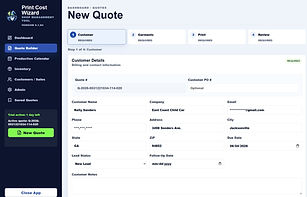
The New Quote page is where each job begins. This page allows users to enter customer information, job details, due dates, garment information, quantities, and basic order notes in one clean and organized place. It helps keep every quote consistent, easy to review, and ready to move through the pricing process.

The Garments section of the Quote Builder is where the shop enters all apparel details for the order. Users can add garment style, brand, color, sizes, quantities, supplier cost, and any customer-supplied items. This keeps the order organized and helps ensure the quote is built using accurate garment information from the start.

The Print Specifications section is where the shop enters the details for how the design should be printed. This includes print location, design placement, ink colors, number of colors, print size, and any special notes needed for production. It helps make sure the quote, artwork, and final print instructions are clear before the job moves forward.

The Quote Summary section brings everything together in one clear view. After entering the customer details, garment information, print specifications, and pricing details, the shop can quickly review the full quote before saving or sending it. With just 4 simple steps, Print Cost Wizard makes building a quote fast, organized, and easy.